In this page we will explain to you how you can remove your account from Seekia, what data is deleted, what data is retained for a limited period of time and how you can delete some data without closing your account.
Seekia is an application of fashion with artificial intelligence developed by Seekia.
You can delete your account directly from the application, without the need to write us by mail.
Follow these steps:
Open the app Seekia and log in with your account.
Go to your profile.
Click on the option “Edit my account”.
Scroll down and click on the button “Delete account”.
Confirm that you want to delete your account when the app will ask again.
Once you confirm, the removal is permanent and you will not be able to recover your account or the associated data.
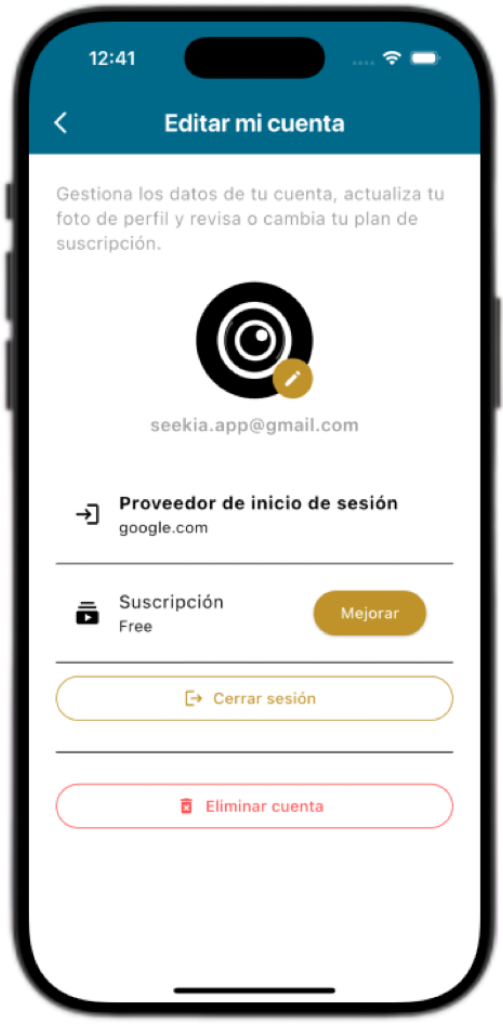
When you delete your account from the app, deleted or anonimizan the following data associated with your user profile:
account information
e-mail Address used to register or login.
Profile picture and basic settings of your account (language, location preferences, etc).
Content of your experience in Seekia
Your closet digital (clothing added, photos, descriptions, and metadata).
Your photos and associated settings to “My photo for Vísteme” and the looks are generated on your image.
History of outfits, recommendations and sections as a Timeline or recent activities.
Suitcases and travel plans created within the app.
Favorites, tier points and level within Seekia.
Configurations associated to your profile,
Preferences, notifications, language, and other settings related to your account.
After completing the process, your account is no longer active and will not be able to sign with her.
In some cases, we may retain certain information for a limited period of time, for legal reasons, security, or technical maintenance, for example:
technical Records and copies of internal security
, Some data may remain temporarily in backup copies and logs (system logs), but are permanently deleted within a maximum reasonable after the removal of the account.
Payment information and billing (if applicable)
If you’ve hired a paid subscription through Google Play or the App Store, these platforms can be to keep your billing information according to their own policies and legal obligations. Seekia directly manages your complete information of payment.
In any case:
we will Not use the data of a deleted account to create new profiles.
We won’t show your personal information, or content associated with your account once it has been removed.
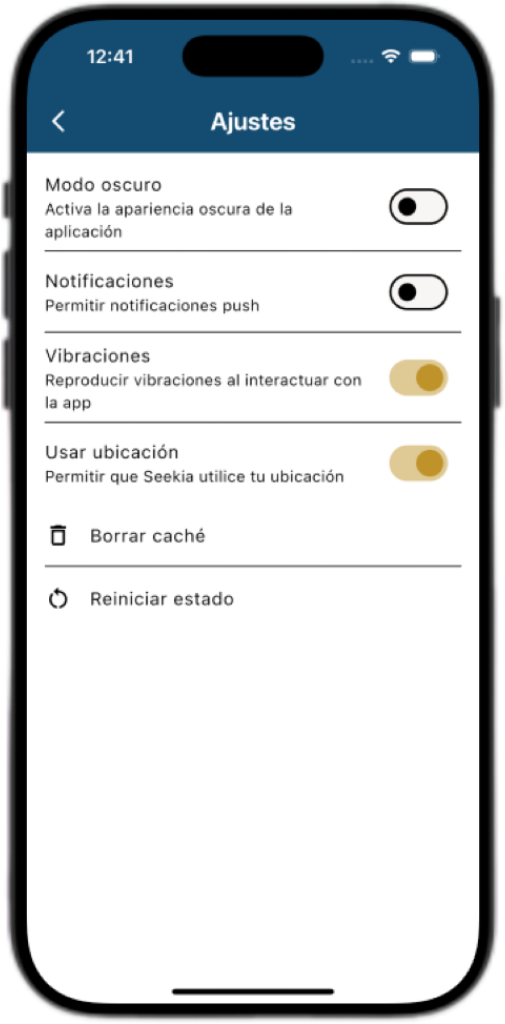
If you want to continue using Seekia but delete part of the data, the app gives you options from the screen Settings.
In Settings you will find the option “Clear cache”.
This option allows you to:
Delete temporary data stored in the app on your device (for example, recent results or information cached).
Free space and restart certain local content.
What NOT to do “Clear cache”:
it does Not delete your account Seekia.
It does not erase your closet digital nor thy garments saved.
It does not delete your subscriptions, or your billing history.
In Settings , you will also see the option “Reset status”.
This option
Resets your points and at the user level within the app.
It is useful if you want to start from scratch, your progress status in Seekia.
What NOT to do “Reset status”:
it does Not delete your account.
It does not erase your clothes, closet, photo, or history of outfits.
It does not affect your current subscription.
If you no longer have access to your device, or you can’t sign in to the app, you can also request the deletion of your account by contacting us.
Send an e-mail to: seekia.app@gmail.com
On the subject, writes: “Delete account Seekia”.
In the body of the message, indicates:
The address e-mail with which you registered in Seekia.
You request deletion of your account and associated data.
Example of message:
“Hello, I want to delete my account Seekia and the data associated with the address: tunombre@correo.com.”
We will process your request in the shortest time possible and you will receive a confirmation by e-mail when the removal is complete.
For more details on how we process your data, see our Privacy Policy and Terms and Conditions of Seekia from the app or from our official website.
If you have any further questions on the deletion of accounts or the management of your data, you can write to us at: seekia.app@gmail.com.
© 2025 Seekia. All rights reserved.